
S3 Storage Optimization
From Standard to Intelligent and Beyond


It's no longer a secret that the emergence of cloud platforms has revolutionized data storage costs. The ability to store data on third-party servers and only pay for the utilized capacity, along with the high scalability offered by most platforms, has enabled numerous companies to significantly reduce their expenses. This shift allows them to avoid over-provisioning and paying for unused capacity.
However, this transition has led many organizations to mistakenly assume that their data storage is now fully optimized. Falling into this trap is easy, as even with an inefficient storage policy, a cloud environment often remains more cost-effective than its on-premises counterpart. Consequently, it may seem that optimization "has already been achieved," and valuable resources can be allocated elsewhere. Unfortunately, this is frequently not the case. Optimizing the lifecycle policy can lead to additional savings and may be simpler than you imagine.
This is especially appealing to companies with substantial data storage requirements, such as one of our clients at Multilayer, who store several petabytes in AWS S3. With an annual bill totaling several million dollars, even a small percentage improvement can result in significantly increased profits and valuation.
The majority of their files were deleted shortly after creation and had very few downloads. Only a tiny minority were stored for extended periods and downloaded thousands of times. This means that their straightforward lifecycle policy, which merely shifted files to Glacier Instant Retrieval after a certain number of days, suited most files well. However, a small minority was causing disproportionately high costs.
Let’s review the S3 tiers and pricing model to understand the problem.
Intro to S3 Tiering
AWS S3 (Simple Storage Service) offers a range of storage options designed to help customers optimize both cost and performance according to their usage patterns and access requirements. Below is a summary of the various S3 storage classes:
S3 Standard: This serves as the default storage class and boasts high durability, availability, and performance. It's well-suited for frequently accessed data, delivering low latency and high throughput.
S3 Standard-Infrequent Access: Ideal for data that's accessed less frequently but still necessitates immediate availability when required. It delivers the same performance as S3 Standard but at a reduced storage cost.
S3 One Zone-Infrequent Access: Similar to S3 Standard-IA but stores data in a single availability zone rather than multiple zones. While it is more cost-effective than S3 Standard-IA, it has reduced availability in case of an outage in that specific zone.
S3 Glacier Instant Retrieval: Tailored for long-lived archive data accessed quarterly, offering the lowest storage costs with retrieval times measured in milliseconds.
S3 Glacier Flexible Retrieval: Designed for rarely accessed data, this storage class can accommodate retrieval times ranging from 1 minute to 12 hours.
S3 Glacier Deep Archive: Intended for long-term data archiving that is rarely accessed, this class tolerates retrieval times of up to 12 hours. It is the most economical option among all S3 storage classes, albeit with longer retrieval times.
S3 Intelligent-Tiering: This storage class automatically migrates objects among three access tiers (frequent access, infrequent access, and archive instant access) based on access patterns. It is intended for data with uncertain or fluctuating access patterns and helps optimize costs without compromising performance. Optionally, Intelligent-Tiering can be configured to utilize two additional tiers: archive access and deep archive access
In conclusion, there are five storage classes that offer instant retrieval and two with retrieval times spanning from 1 minute to 12 hours. When you don't require instant retrieval, the decision is rather straightforward. However…
When instant retrieval is a necessity, which storage class should you opt for? Should Intelligent Tiering bet the preferred default choice?
Intro to S3 Pricing
NOTE: S3 pricing is subject to change, and this article may become outdated. Please refer to the latest information on the S3 pricing page.
Before addressing the question at hand, let's delve into the key components of S3 pricing.
Storage
1 GB stored for 1 month (30 days) costs $0.023 in Standard tier and, comparatively, “only” $0.004 in Glacier Instant Retrieval.
Now, if you have 5GB of data, the cost becomes five times the price for 1GB, which is a straightforward calculation. However, what if the storage duration is less than 1 month?
This is where it's crucial to pay attention to the fine print: several tiers impose a minimum duration for which you'll be charged, even if you delete the file(s) before that period elapses. For instance, Glacier Instant Retrieval has a minimum duration of 90 days.
So, if you store 1GB of data for 1 month and then delete it, the storage cost amounts to $0.023 in the Standard tier and $0.012 (3 x $0.004) in the case of Glacier Instant Retrieval.
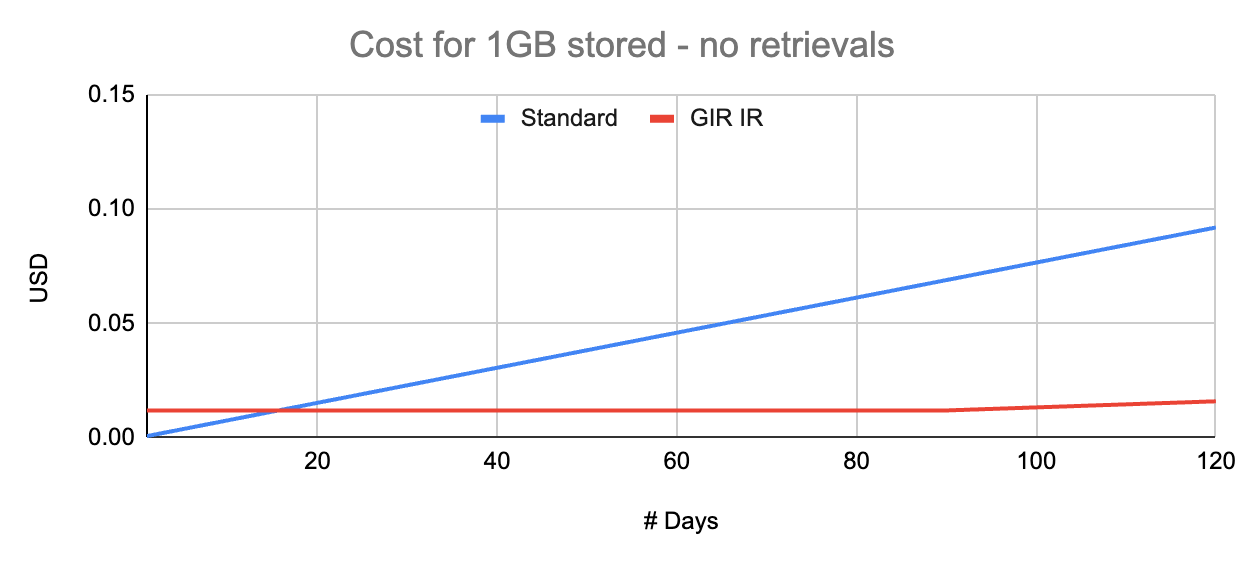
Still a Cost-Efficient Choice! But What About Frequent Downloads?
Data Retrieval
The Standard tier comes with no data retrieval cost. For Standard-Infrequent Access, it's $0.01 per GB retrieved, and for Glacier Instant Retrieval, it's $0.03 per GB retrieved.
Now, let's revisit our 1GB stored for 1 month example. A single download from Glacier Instant Retrieval would add $0.03 to the total cost, making it pricier than the Standard tier.
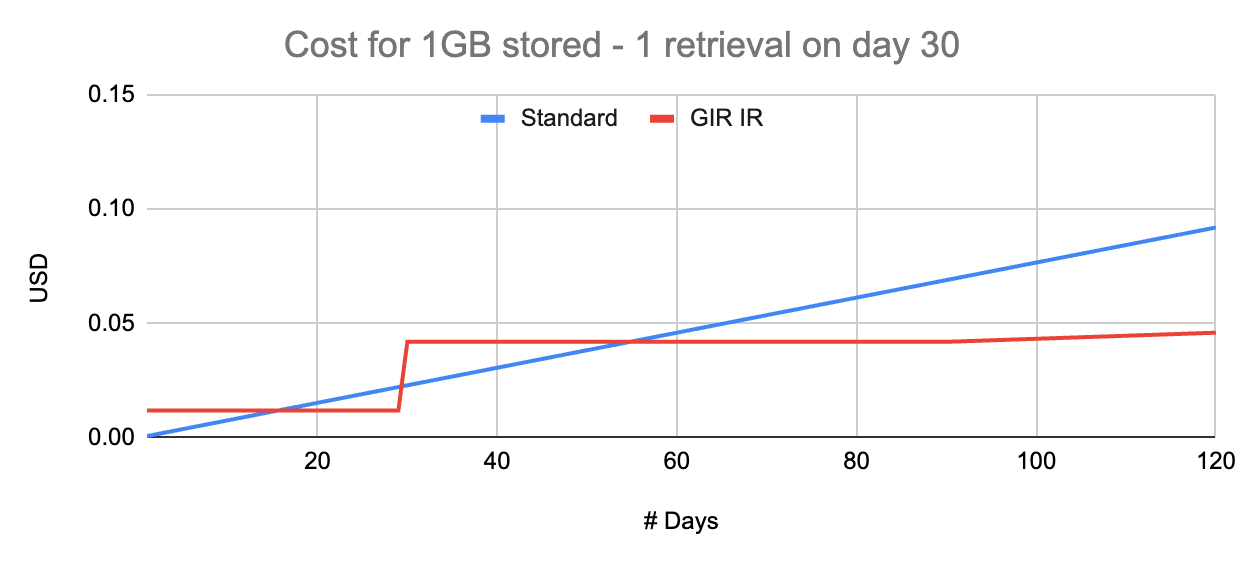
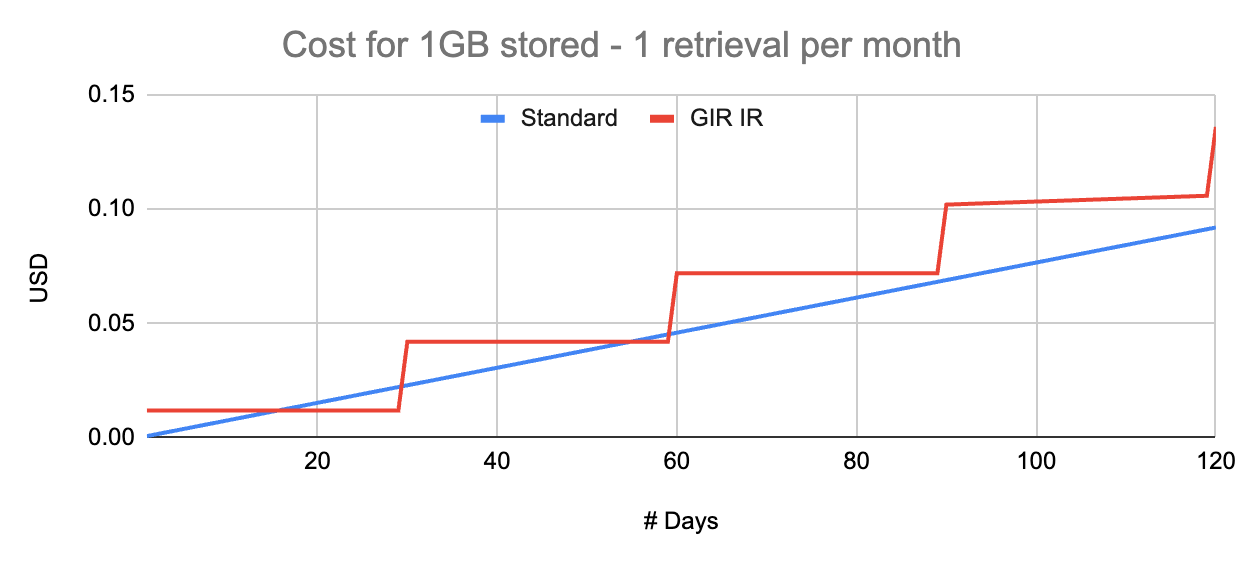
Lesson: The files' expected data retrieval pattern is crucial to selecting the correct tier.
Ideally, a machine learning model could estimate the probability of future downloads for each file, allowing for an optimized lifecycle policy using object tags.
Data Transfer Out
When data is downloaded from S3, there's a data transfer out cost. This cost solely depends on the file size, regardless of the storage tier. Data transfer out from S3 to AWS CloudFront is free, but downloading from CloudFront is not. Prices typically range from $0.08 to $0.11 per GB.
Requests & Other Costs
S3 has additional cost components like requests, monitoring, analytics, but these are typically minor in comparison, unless you're dealing with billions of very small files.
Intelligent Tiering
Intelligent Tiering deserves special attention. The term "intelligent" might sound a tad pretentious; a more precise name could be "access-based tiering."
Intelligent Tiering moves files to cheaper storage classes if they are not accessed in a fixed and unconfigurable number of days.
Advantages of Intelligent Tiering:
Exceptionally simple to activate, requiring no engineering effort.
Ideal for optimizing costs when you can't predict access patterns for long-term stored files.
There are no data retrieval costs.
However, there are some drawbacks:
Additional monitoring costs may apply, typically negligible unless you're managing billions of very small files.
You can't customize the fixed number of days for moving between tiers. In many scenarios, waiting for 30 or 90 consecutive days is too long.
If you can predict access patterns, creating a custom lifecycle policy optimized for your specific use case is possible but requires some engineering work.
Returning to the Initial Question:
If you need instant retrieval, which storage class should you choose? Should Intelligent Tiering be the default choice?
Intelligent Tiering should be the default choice when you can't anticipate the access patterns of long-term stored files.
If your files are typically deleted in less than 30 days, it's better to stick with the Standard tier to avoid additional monitoring costs.
However, if you have files stored for several weeks or months and possess historical access pattern data, there's a high likelihood that a straightforward statistical analysis can unveil some low-hanging fruit for significant savings. For even greater savings, a deeper analysis can lead to designing a machine learning model for predicting future access probabilities, resulting in an optimal lifecycle policy that could save you hundreds of thousands of dollars.
This is not just hypothetical; At Multilayer, (on this occasion, in collaboration with Alex Alves) we have already helped companies optimize their storage policy. If after reading this you suspect yours could be improved, don’t hesitate to drop as a line at info@multilayer.io